


Listing Optimiser #
Listing Optimiser is a tool in AgentNet that helps you know your competition, improve your listing, and track what works — for every listing, at every stage. You’ll find it under Listings, on each individual listing. It brings together how your listing compares with competing properties nearby, recommendations on what to improve, and your impressions, views and leads, all in one place.
How Does Listing Optimiser Work? #
Listing Optimiser comes with the following core features:
- Market
- Recommendations
- Statistics
Market #
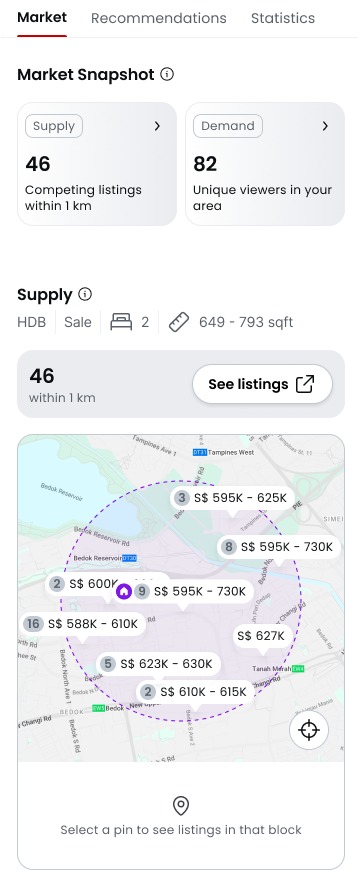
- Supply — see your competition
- See competing listings within your area within 1km, plotted so you know exactly who a buyer is comparing you to.
- Demand — real buyer interest
- See unique views in the past 7 days, along with the peak times buyers are actually viewing listings like yours.
- Filter competing listings by most relevant, lowest price, highest price, or newest.
Recommendations
#
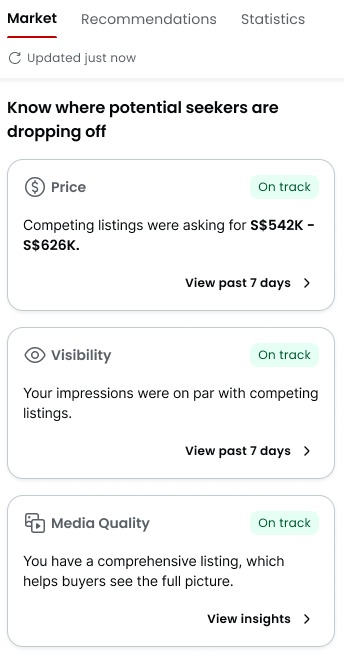
- Recommendations across pricing, visibility, and media quality.
- Three dimensions
- Visibility — are buyers finding you? See how you’re showing up in search, and which ad tools (e.g. Turbo, Boost) can help.
- Pricing — see if your asking price is above or below the local range, before a buyer notices.
- Media quality — spot the photos that might be costing you clicks
Statistics #
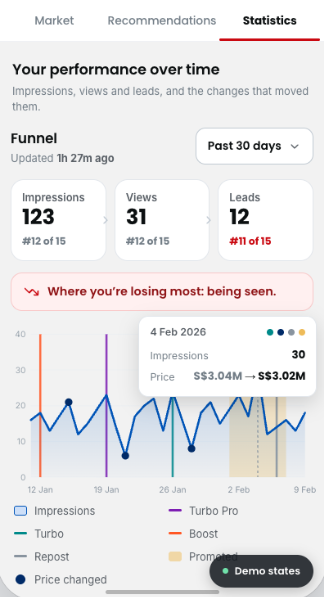
- Daily data, for up to 180 days
- Impressions, views, and leads are tracked on a daily basis, so you’re not waiting days to see how a listing is doing.
- See the impact of ad tools
- Track how tools like Boost, Turbo, Turbo Pro, Repost, or Promoted Listings affected your numbers.
- Built on Listing Performance Insights
- Statistics includes everything Listing Performance Insights showed you — now as part of the fuller Listing Optimiser picture.
How to Access Listing Optimiser #
- On your AgentNet, visit Listings > click “Listing Optimiser” on any listing.
- Check Market to see how your listing compares to nearby competition, and how much buyer interest there is.
- Review your Recommendations across pricing, visibility, and media quality.
- Check Statistics to track impressions, views, and leads over time, and see what moved them.