
Promoted Listings – Expand Your Reach Beyond Exact Searches #
Promoted Listings is a flexible, pay-as-you-go advertising tool that helps your property appear in relevant, similar searches — not just exact matches. This means your listing can show up in nearby locations, similar price ranges, or comparable property sizes, securing reserved spots on the first two pages of search results on PropertyGuru.
If you have a listing that’s struggling to attract attention due to location, accessibility, or pricing, Promoted Listings helps you tap into buyers actively browsing similar options.
Where Your Listing Will Appear #
Your listing will appear in one of the reserved promoted slots (positions: 2, 7, 13, 19, 25) when it meets at least one search filter within its set boundary.
| Search Criteria | Relevance Rules | Example |
|---|---|---|
| Project-only searches | 2nd Slot: listings up to 500m from the searched project 7th, 13th, 19th, 25th Slot: listings between 500m and 1.5km from the searched project |
|
| Price only searches | 2nd Slot: listings within +/-10% of the buyer’s budget 7th, 13th, 19th, 25th Slot: listings within +/-20% of the buyer’s budget
|
|
| Bedroom-only searches | You can have one extra bedroom |
|
| Multi-criteria searches | Your listing will show in a promoted slot if at least one criterion falls within its boundary. |
|
How to Start a Promoted Listings Campaign #
-
Go to My Listings in AgentNet.
-
Click Promote on the listing you wish to advertise.
-
Set your Priority (affects placement and cost).
-
Set your daily Ad Credit budget.
-
Choose your campaign duration.
-
Launch and track performance.
Understanding Campaign Settings #
Priority
Priority determines how likely your campaign will be successful, as well as how high your Promoted Listing is displayed in the search results – the higher your Priority, the more likely that your Promoted Listing appears near the top of the page, above other Promoted Listings running in the same category.
Therefore, this could help to increase the views and speed of transactions. Priority will also determine how much you pay per 1,000 appearances in search.
Daily Budget
As Promoted Listing is a pay-as-you-go tool, the number of Ad Credits required is quoted per 1,000 appearances in search.
The daily budget helps you control your costs, as it lets you set the maximum number of Ad Credits that you wish to spend per day. This affects the number of appearances that your listing receives per day.
Pricing & Charges #
-
Powered by Ad Credits.
-
Dynamic Pricing applies — cost differs based on location, property type, and market demand.
-
Ad Credits are deducted daily at 2 AM SGT for the previous day’s impressions.
Important Update: Changes to Promoted Listings (Effective 1 Oct 2025) #
Previously, Promoted Listings were displayed with profile photo, agent name and headlines and were available for all Agent Packages.
Effective from 1 Oct 2025, Promoted Listings will be a ranking-only feature available to Silver, Gold and Platinum packages only.
Branding elements such as profile photo and agent name will now be reflected based on your Agent Packages for other listing actions (Regular, Boost, Turbo and Turbo Pro).
Below are examples of howPromoted Listings appear on search results based on the various recommendation criteria:
| Recommendation Criteria | Preview On App | Preview On Web |
|---|---|---|
| Price Range | 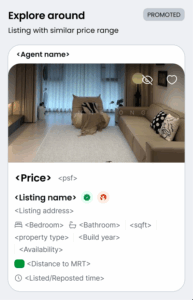 | 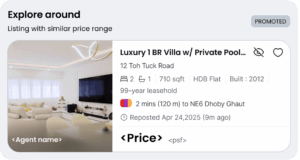 |
| Distance | 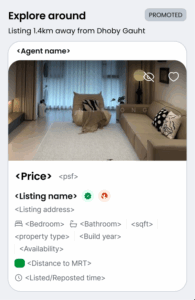 | 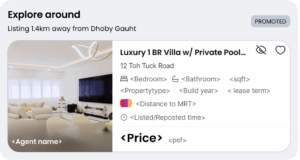 |
| Multi-criteria | 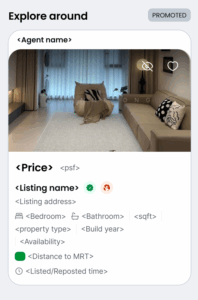 | 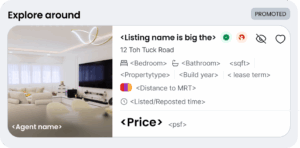 |
Frequently Asked Questions #
What’s the difference between Turbo/Boost and Promoted Listings?
Turbo/Boost pushes your listing higher in exact-match searches. Promoted Listings expands reach to similar but not exact searches.
What kind of listings should I promote?
Promoted Listings are great for any property that needs more exposure. They work exceptionally well for:
-
Near popular areas/projects: Tap into nearby demand
-
Slow to sell or low views: Reach more interested buyers
Can I choose where my listing appears?
No, placements are auto-optimised for relevance. This ensures your listing appears in the most promising similar searches.
How long will my Promoted Listing stay active?
You decide how long you want your Promoted Listing to run for!
The duration for a Promoted Listing can be set at a minimum of 3 days and a maximum of 30 days, and it can also be stopped at any time.
If the daily Ad Credit budget is fully met, the Promoted Listing will stop for the day and then automatically resume the next day.
Your Promoted Listing will be automatically stopped if the listing expires, is deactivated, or if the listing details are updated.
What happens if I run out of Ad Credits?
Your campaign will pause automatically. Top up Ad Credits to resume.
Why don’t I see my promoted listing?
Appearances are personalised to each seeker. Use the performance report to track actual impressions and leads.
Can I view the performance of my Promoted Listing?
Yes! You can view your Promoted Listing performance report at any time on Agentnet; however, the report has a 2-hour delay for appearances in search data and a 2-day delay in listing views and leads data.
As such, you will be able to view your campaign performance 2 hours after the start of the Promoted Listing.
You can also check on the performance of completed or stopped Promoted Listings in the report.
How do I stop my Promoted listings?
-
1. Go to AgentNet > My Listings. Choose the Promoted Listing that you wish to stop and click “Stop campaign”
-
2. Click “Confirm”
Your Promoted Listing will be stopped immediately, and you will be charged for the appearances delivered for the campaign until cancellation.
Can I rerun a past campaign?
Yes, go to the campaign history, select Rerun, and confirm.
Is Promoted Listings available on CommercialGuru?
Promoted Listings are not available for commercial listings at the moment.