
Turbo: Advance your position #
Turbo is a ranking feature that pushes your listing higher in search results compared to Boost, making it more visible to potential property seekers.
With Turbo, you can:
-
Achieve higher rankings in search results
-
Reach more property seekers for maximum exposure
-
Stay ahead of other listings in competitive markets
How Does Turbo Work #
-
Duration: Each Turbo listing lasts 7 days.
-
Quality Score Requirement: Listings must have at least 95% Quality Score.
-
Ad Credits: Dynamic pricing applies based on market demand and listing supply.
-
Upgrading from Boost? You’ll only need to top up the remaining Ad Credits to switch to Turbo.
How to Turbo Your Listings #
Single Listing Turbo
-
Go to AgentNet > Listings.
-
Select the listing you want to Turbo and click Turbo.
-
Review the Turbo details (Ad Credits needed will be shown).
-
Click Turbo Now to activate.
Visual Indicators:
-
Light Blue Tab: Turbo is active.
-
Orange Tab (3 days before expiry): Reminder that your Turbo is ending.
-
Expiry Date: Displayed on the tab.
Auto-Turbo
-
Auto-Turbo automatically renews your listing every 7 days until you turn it off.
-
Your listing’s Turbo ranking is refreshed with each renewal.
-
Managing Auto-Turbo:
-
Enable: Go to your listing’s Turbo tab > Switch to Auto-Turbo > Confirm
-
Disable: Go to your listing’s Turbo tab > Deactivate Auto-Turbo
-
Charges: Ad Credits are only deducted on renewal (Dynamic Pricing applies) until you turn Auto-Turbo off or the listing expires — no cost to turn on/off.
-
Important Update: Changes to Turbo Features (Effective 1 Oct 2025) #
Previously, Turbo came with additional branding enhancements, including:
-
Extra-large images – offering greater visibility with a larger image carousel and cover photo on desktop.
-
Contact Agent button on search results – enabling property seekers to initiate direct conversations with agents easily.
-
Profile photo and property headline – displayed prominently next to the contact button for a more substantial agent presence.
Effective 1 Oct 2025, Turbo will be a ranking-only feature, securing more exposure by prioritising your listing above Boost and regular listings.
Branding elements such as larger card design, profile photo, headline, and prominent contact button will now be reflected based on your Agent Packages, giving you complete control over your branding presence across all your listings.
Turbo Before vs After (Quick View) #
| Feature | Turbo (Before 1 Oct 2025) | Turbo (From 1 Oct 2025) |
|---|---|---|
| Extra-large image | Included | Image size reflected based on your Agent Packages |
| Contact Agent button on SRP | Included | Gold / Platinum tiers only |
| Profile photo | Included | Gold / Platinum tiers only |
| Property headline | Included | Gold / Platinum tiers only |
| Ad-free listing details page | Included | Included |
| Ranking priority | High | High |
Comparing The Ranking Tools #
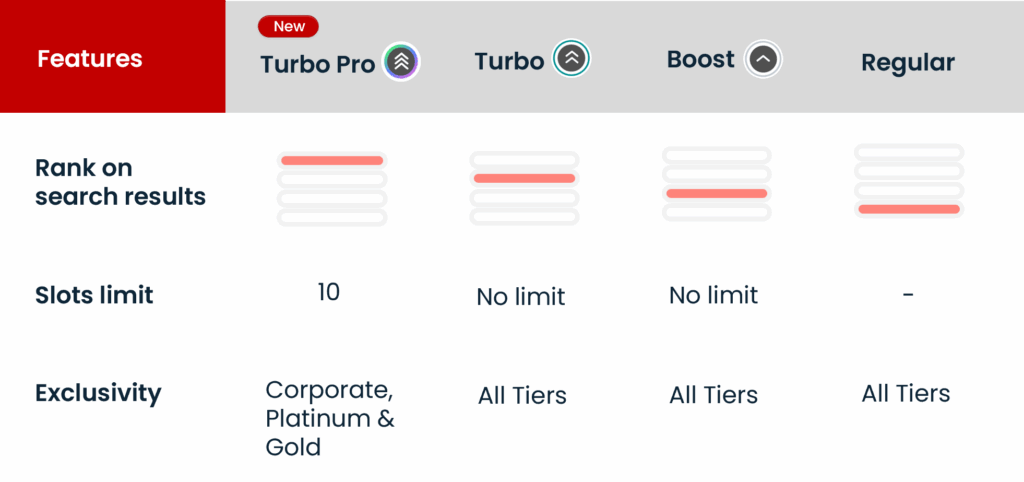
In short: #
-
Boost is the affordable way to step up from regular listings.
-
Turbo accelerates visibility with higher placement than Boost.
-
Turbo Pro locks in a top 10 spot for Gold & Platinum agents in high-demand markets.
Frequently Asked Questions #
Is Turbo available for all listings?
Yes. Turbo is available for residential and commercial listings.
What happens if I don’t have enough Ad Credits for Auto-Turbo?
Your Turbo will not renew, and Auto-Turbo will be disabled until you reactivate it.
Does Turbo reduce the number of listings shown per page?
No. The number of listings per search results page remains unchanged.
Can Turbo be used together with Boost?
No, they cannot coexist on the same listing. Turbo always takes precedence. If you activate Turbo while Boost is active, your Boost will end early.
Can I Use Turbo If I Already Have Boost Active?
Yes! However, there are a few things to note:
-
You can activate Turbo even if Boost is already active.
-
You’ll only need to top up the difference between what you’ve already spent on Boost and the cost of Turbo.
-
This makes upgrading easier without losing your earlier spend.
How Is the Turbo Top-Up Calculated?
When upgrading from Boost to Turbo, your top-up amount will be:
Turbo cost – [(Remaining days of Boost ÷ 7) × Boost cost]
Example:
-
Your Boost campaign costs 70 Ad Credits for 7 days, and you want to upgrade to Turbo after 3 days.
-
Remaining Boost value = (4/7) × 70 Ad Credits = 40 Ad Credits
-
If Turbo costs 100 Ad Credits, you pay 100 – 40 = 60 Ad Credits to upgrade from Boost to Turbo