
Boost: Stand above Regular Listings #
Boost is a powerful feature that increases your listings’ visibility, helping you attract serious property seekers.
Accessible to all packages, Boosted listings are ranked higher than regular listings in search results, making them much more likely to be seen and clicked.
Whether you’re marketing residential or commercial properties, Boost makes it easy to stand out.
How Does Boost Work #
-
Duration: Each Boost listing lasts 7 days.
-
Quality Score Requirement: Listings must have at least 85% Quality Score.
-
Ad Credits: Dynamic pricing applies based on market demand and listing supply.
How to Boost Your Listings #
Single Listing Boost
-
Go to AgentNet > Listings.
-
Select the listing and click Boost.
-
Review the Boost details (Ad Credits needed will be shown).
-
Click Boost Now to activate.
Visual Indicators:
-
Light Blue Tab: Boost is active.
-
Orange Tab (3 days before expiry): Reminder that your Boost is ending.
-
Expiry Date: Displayed on the tab.
Auto-Boost
-
Auto-Boost automatically renews your listing every 7 days until you turn it off.
-
Your listing’s Boost ranking is refreshed with each renewal.
-
Managing Auto-Boost:
-
Enable: Go to your listing’s Boost tab > Switch to Auto-Boost > Confirm
-
Disable: Go to your listing’s Boost tab > Deactivate Auto-Boost
-
Charges: Ad Credits are only deducted on renewal (Dynamic Pricing applies) until you turn Auto-Boost off or the listing expires — no cost to enable/disable.
-
Bulk Boost (Up to 100 Listings)
-
Go to Active Listings and click Select.
-
Choose up to 100 listings, then click Boost.
-
Review selected listings and Ad Credits needed.
-
Click Boost Now to activate all at once.
Important Update: Changes to Boost Features (Effective 1 Oct 2025) #
Previously, Boost listings offered additional branding enhancements, including a profile photo that was displayed next to your listing in search results for improved agent visibility.
Effective 1 Oct 2025, Boost will now be a ranking-only feature, giving your listing more visibility by prioritising it above regular listings in search results.
Branding elements such as profile photo visibility will now be reflected based on your Agent Packages, giving you consistent branding across all your listings.
Boost Before vs After (Quick View) #
| Feature | Boost (Before 1 Oct 2025) | Boost (From 1 Oct 2025) |
|---|---|---|
| Profile photo | Included | Reflected based on your Agent Packages |
| Ad-free listing detail page | Included | Included |
| Ranking priority | Moderate | Moderate |
Comparing The Ranking Tools #
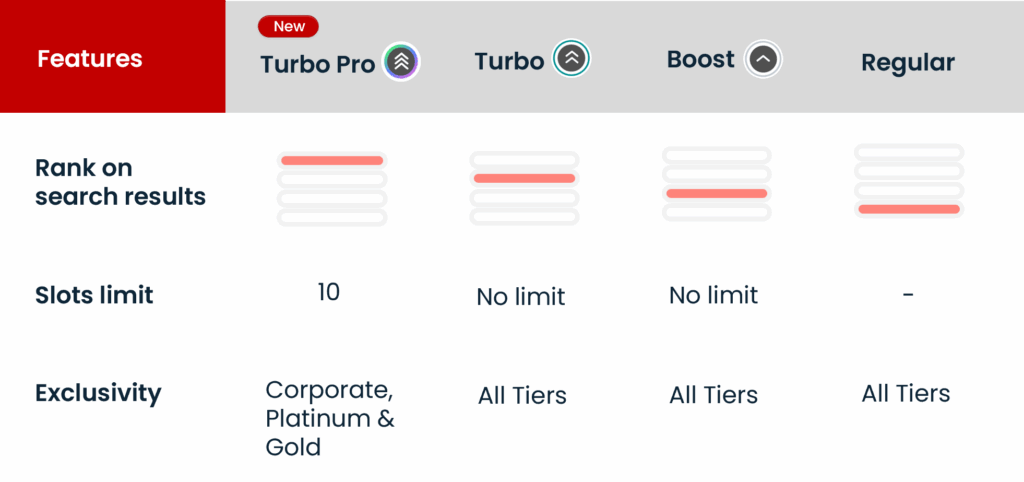
In short: #
-
Boost is the affordable way to step up from regular listings.
-
Turbo accelerates visibility with higher placement than Boost.
-
Turbo Pro locks in a top 10 spot for Gold & Platinum agents in high-demand markets.
Frequently Asked Questions #
Is Boost always on for Platinum agents?
Yes! All your listings are automatically Boosted — no manual activation or extra credits needed.
Can I Boost a commercial listing?
Yes. Boost is available for residential and commercial listings.
Can I cancel or refund a Boost?
No. Boost action cannot be cancelled or refunded once activated.
Can I Repost a Boosted listing?
Yes. Reposting refreshes your listing’s position among all Boosted listings without cancelling the active Boost.
How many Boosted listings appear per page?
There’s no fixed number. Boosted listings are displayed based on relevance, search behaviour, and listing quality.