
Turbo Pro: Get unmatched prominence #
Turbo Pro is a premium ranking product that places your listing in the guaranteed top 10 spots in search results — above Turbo, Boost, and regular listings.
It’s exclusively available to Gold and Platinum agents and is designed to give you:
-
Guaranteed top 10 placement in search results.
-
Unmatched visibility for your listings in high-demand areas.
-
Exclusivity with limited slots per location.
When you want faster results and greater impact, Turbo Pro helps you get seen first and attract more enquiries.
How Does Turbo Pro Work #
Turbo Pro is a 7-day premium product that works similarly to Turbo, but with even higher placement. Here’s how it works:
-
Turbo Pro activates immediately once you purchase it.
-
Slots are limited. Once all 10 slots are filled for a specific property type and location, Turbo Pro will display as “Sold Out.”
-
Once Turbo Pro is active, other ad products for that listing will be disabled, except for Promoted Listings and Repost options.
-
Ad Credits required: Dynamic pricing applies based on market demand and listing supply.
Where Is Turbo Pro Available #
Turbo Pro can be used for both Residential and Commercial listings, so you can use it where it matters most.
Here’s how slots are allocated:
Residential
-
Condo – 10 slots per Project
-
HDB – 10 slots per HDB Estate
-
Landed – 10 slots per combination of Landed Property Type and District
Commercial
-
Retail – 10 slots per District
-
Industrial – 10 slots per District
-
Office – 10 slots per District
-
Land – 10 slots per District
How to Activate Turbo Pro #
Here’s how to activate Turbo Pro:
-
Log in to AgentNet > Listings.
-
Select the listing you want to upgrade and click Turbo Pro (only available for Gold & Platinum packages).
-
Review the Turbo Pro details (Available slots and Ad Credits needed will be shown).
-
Click Turbo Pro Now to activate.
If you have enough credits and slots are available, Turbo Pro will activate immediately!
Can I Automate Turbo Pro?
Yes! Use Auto Turbo Pro to renew your listing every 7 days automatically.
-
Enable during purchase or anytime later.
-
If you run out of credits, Auto Turbo Pro will pause automatically — no unexpected charges.
Comparing The Ranking Tools #
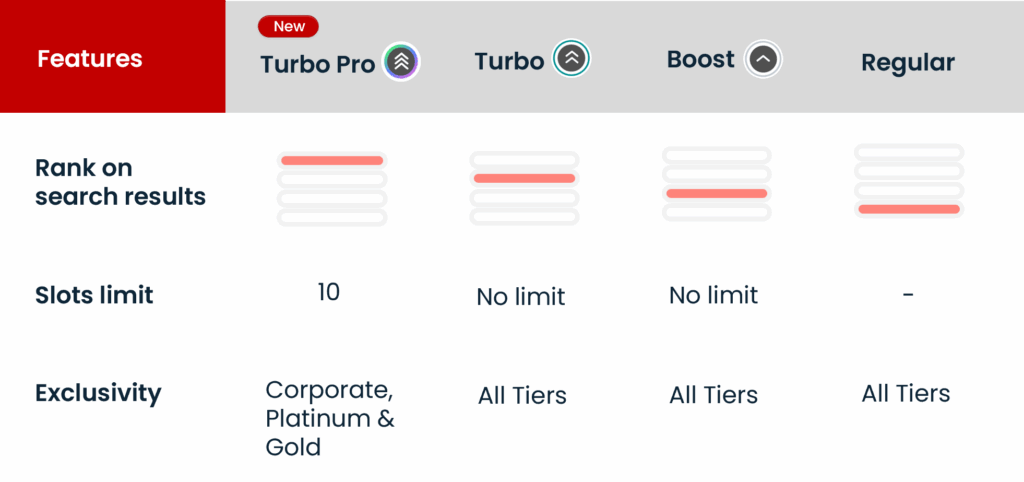
In short:
-
Boost is the affordable way to step up from regular listings.
-
Turbo accelerates visibility with higher placement than Boost.
-
Turbo Pro locks in a top 10 spot for Gold & Platinum agents in high-demand markets.
Frequently Asked Questions #
How is Turbo Pro different from Turbo?
Turbo Pro guarantees a top 10 spot and is exclusive to Gold & Platinum agents, while Turbo places you above Boost but does not guarantee ranking.
How Will My Listing Appear to Property Seekers after Turbo Pro is activated?
Turbo Pro listings are shown right at the top of the search results page, above all other products like Turbo and Boost.
-
Within the Turbo Pro slots, listings are ordered by last updated or reposted first.
-
Your listing design and branding will remain consistent with your current subscription package for a professional look.
Can I Upgrade to Turbo Pro from Boost or Turbo?
Yes. You can upgrade any Boost or Turbo listing to Turbo Pro anytime.
-
Pro-rated pricing: You only pay the difference for the remaining days.
-
Note: If upgrading from a free Boost entitlement, the full Turbo Pro cost applies.
What Happens If Turbo Pro Slots Are Sold Out?
If all Turbo Pro slots are currently booked:
-
You’ll see Sold Out indicated next to the Turbo Pro icon on your listing.
-
You can opt in to get a notification as soon as a slot becomes available.
-
If Auto Turbo Pro fills all slots, we’ll notify you accordingly.
How Much Does Turbo Pro Cost?
Turbo Pro pricing varies depending on the property type and location. Prices are set using our dynamic pricing system, which adjusts to reflect current market conditions and demand. Be sure to check the latest price displayed in AgentNet before confirming your purchase.
How Can I Track Turbo Pro Performance?
Keep an eye on how your Turbo Pro listings are performing by checking:
-
Views, impressions, and leads generated from Turbo Pro.
-
Credit usage details in your Ad Credits report.
-
Turbo Pro listing data in your Listing Performance report.
This helps you measure your ROI and make smarter decisions for future campaigns.
What happens to my Turbo Pro if I downgrade my subscription?
Any active Turbo Pro bookings will continue until they expire. However, you’ll lose eligibility for future Turbo Pro purchases unless you upgrade your package again.